01
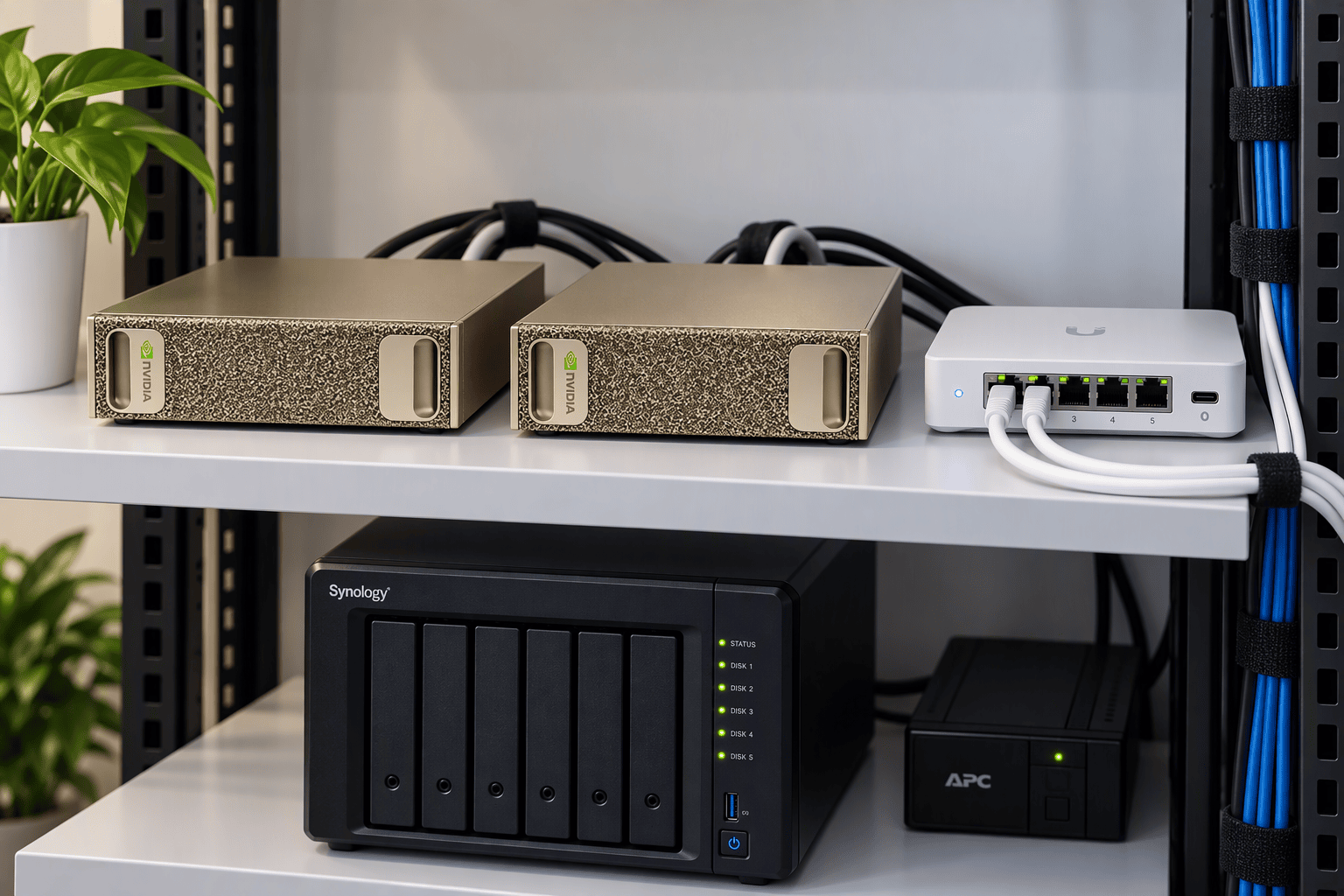
NVIDIA DGX Spark A desktop-sized AI computer with 128 GB of memory that runs the AI models. Busier offices add units.
PRIVATE AI, EXPLAINED
On-premise AI means the AI model runs on a box in your office instead of on a provider's servers. Your team gets a ChatGPT-style assistant and answers from your own documents, while client or patient information never leaves the building.
This guide covers what's in the box, what it can and can't do, and what it really costs, including the answer most vendors skip: on seat price alone, cloud AI is cheaper.
Prices checked October–November 2026. AI hardware prices are moving quickly; confirm before you buy.
WHY IT MATTERS NOW
In most small offices, AI arrived without a decision. Someone started drafting letters in a free chatbot. Someone else pasted in a client's notice to get a summary. Before long, confidential information is flowing to outside services nobody vetted, under terms nobody read. This fall's run of security incidents at cloud AI platforms has made the question hard to ignore: Where does that data actually go?
For regulated offices, it's more than a worry. Tax preparers must protect return information and generally need a client's consent before it's disclosed, and the IRS has told practitioners to use only secure, firm-approved AI with client data. Medical practices need a business associate agreement before patient information goes to any vendor. Law firms owe clients confidentiality, and the American Bar Association has said that putting client information into some AI tools requires the client's informed consent. The risk of doing it wrong is costly.
On-premise AI gives those offices a sanctioned place to do the same work. The model, your documents and every answer stay on equipment you own.
WHAT'S INSIDE
Venturi's on-premise system for small offices is the Micro AI Factory. It isn't a data center. It fits on a closet shelf, plugs into a standard outlet and a network port, and runs open AI models, the kind anyone can download and run. It arrives set up for your type of office, with assistants that answer from your own procedures, templates and reference documents.
NVIDIA DGX Spark A desktop-sized AI computer with 128 GB of memory that runs the AI models. Busier offices add units.
Application Server In larger builds, the server runs the chat site, document library and office's secure web address, so the Spark can focus on AI.
Encrypted Storage Holds the document library, chat history and nightly backups. A removed drive is unreadable.
Business Firewall Keeps the AI system on its own secured network segment.
Battery Backup (UPS) Rides out power blips and shuts the system down cleanly during a long outage.
Single Spark
One DGX Spark runs the models, the chat site and the database.
A small office or a single department.
Spark Plus App Node
A small application server runs the chat site and documents. The Spark runs only the AI models.
Larger teams, many documents or a site that needs its own secure web address.
Multi-Node
Several Sparks share the work behind one application node, with automatic balancing.
Several departments or a busy office operating on one site.
A site can grow from the first size to the third without starting over.
Sometimes a task calls for a larger cloud model. The Micro AI Factory's optional Venturi Privacy Guard handles that without sending the listed identity values out. Before a question leaves the building, the local unit replaces names, contact details, account numbers and ID numbers, including Social Security numbers. The cloud model never receives those values. When the answer returns, the original values are restored locally.
AN HONEST ANSWER
The gap is smaller than most people think. Independent tracking by Epoch AI found that the most capable open-weight models have trailed frontier closed models by about four months on average since January 2026. A small office system typically runs mid-size open models rather than the very largest models, so its capability gap can be somewhat larger. That position can improve as newer open models are released and installed.
The key hardware constraints for local AI are memory capacity and memory bandwidth. A capable office-class deployment commonly lands in the 64 GB to 128 GB range, depending on the models and workloads being served. These are four representative options available in 2026.
NVIDIA DGX Spark
128 GB
About $6,950. Launched at $3,999 in 2025. A 64 GB version starts at $4,999.
~58.7 tokens/sec
Built for AI with NVIDIA's software stack. Strong prompt processing and multi-user serving. Units can be linked for larger models or clustered workloads.
AMD Ryzen AI Max+ 395
128 GB Mini-PC
About $3,600.
~49–55 tokens/sec
Lowest-cost 128 GB option in this comparison. More do-it-yourself, with a less mature AI serving stack than NVIDIA.
Apple Mac Studio
M5 Max / M5 Ultra
M5 Max starts at $2,499. M5 Ultra starts at $5,499. Higher-memory configurations cost more.
~87.9 tokens/sec on the benchmarked 128 GB M5 Max configuration.
Very fast single-stream generation. Strong memory bandwidth, but less aligned with NVIDIA/CUDA-based shared office serving architectures.
NVIDIA RTX PRO 6000
96 GB Workstation
Roughly $12,000–$13,000 class for the GPU alone, depending on current pricing and supplier.
Highest-performance class of these four options for workloads that fit its GPU memory.
Much more power, cooling and workstation infrastructure than most small offices need.
*Generation benchmarks: gpt-oss-120b generation speed for one stream where directly comparable published measurements were available. Results depend on quantization, runtime, context length, configuration and test methodology; benchmark environments are not identical. Prices are snapshots and can change. NVIDIA's 128 GB DGX Spark rose from its $3,999 launch price to $6,950 in 2026, amid higher memory costs. Apple base prices do not represent the price of every higher-memory configuration. Sources reviewed November 2026: Epoch AI; Implicator; ComputingForGeeks; iClarified; Tom's Hardware.
WHAT IT REALLY COSTS?
If all you need is a chat assistant for general work, a cloud subscription is the least expensive option, and we'd tell you so. The comparison changes when the work involves information you can't send out, or when you need more than chat.
Business AI Seats
ChatGPT Business / Claude TeamAbout $7,200-$9,000
Based on roughly $20-$25 per user, per month.
Leading cloud models, shared business workspaces and very little infrastructure for your office to maintain.
Don't assume ordinary business seats are approved for regulated patient data. Sensitive information is still processed on external provider infrastructure, and per-seat cost grows with headcount.
Office-Suite AI
Microsoft 365 Copilot BusinessAbout $7,560
At $21 per user per month, before promotional pricing and in addition to the underlying eligible Microsoft 365 licensing.
AI integrated into Microsoft 365 work, with enterprise data protections and applicable Microsoft business-associate terms for in-scope services.
The data still runs through Microsoft's cloud architecture. Web-grounded requests can introduce a Bing search data path, and advanced agents or specialized document workflows can require additional design and governance.
Do-It-Yourself Local AI
One local AI computerAbout $3,600-$7,000
For the AI computer itself, plus your staff's time, storage, networking and other required infrastructure.
AI models running locally with the ability to keep appropriate data inside the office.
No built-in redundancy, managed support or team to design workflows for you. Security, backups, updates and operations are your responsibility.
Managed Private AI
Venturi Micro AI FactoryHardware you own + implementation + flat monthly management
Data stays in the office for local workloads. The system is installed, secured, monitored and updated for you, with workflows added and refined over time.
The lowest sticker price. You're buying owned infrastructure plus ongoing engineering and management, rather than only AI seats.
Seat-price comparisons use November 2026 list-price ranges before taxes and exclude temporary promotions. ChatGPT Business and Claude Team standard seats are generally $20 per user per month when billed annually or $25 on monthly billing. Microsoft 365 Copilot Business lists at $21 per user per month on annual billing and requires qualifying Microsoft 365 licensing. Product terms, BAA scope and feature coverage vary by provider and can change. Managed private AI is quoted after a short scoping conversation.
The data can't go out: patient records, tax returns, privileged files and closing packages where your rules, your clients or your insurer require tighter control over where data is processed.
You use it heavily: long documents, busy days and agents that run throughout the day use capacity you already own rather than adding another per-user AI seat.
You want more than chat: answers across your own files and automated paperwork require an operational AI system, not simply another chatbot subscription.
You want the know-how to stay: prompts, templates, document knowledge and workflows your team develops can remain part of infrastructure the business controls, rather than living in personal AI accounts.
Not sure which side you're on? The AI Factory Sizer models your users and workloads so you can compare the architecture and economics before you buy.
Open the AI Factory SizerFor a typical small office, hardware and one-time implementation together run approximately $14,000-$100,000, depending on users, workloads and availability requirements. Venturi's managed service typically runs $2,000-$4,000 per month, with the higher service tier intended for healthcare. Final pricing follows workload and site scoping.
DIY OR MANAGED
The hardware ships in a box and the software is free, so a technical owner can get a chat assistant running in a weekend. Running it as a system your whole office relies on is different. Before you decide, be honest about who will do this:
Monitoring, and a plan for when a unit fails.
An isolated network, encryption, multi-factor sign-in, access logs and tested security updates.
Test and install better open models as they are released.
Encrypted backups that are actually restored and checked.
Turn the office's paperwork into new workflows, so it does more than chat.
Buying the AI computer is the easy part. The real system is the ongoing work that keeps it available, secure, current, recoverable and useful to the people in the office.
If you have someone with Linux, AI serving and security experience, do it yourself. If you don't, that list is what a managed service is for. Venturi's units report their health once a minute without sending any prompts or documents, take tested updates only in a maintenance window you choose, and stay sealed: our engineers get in only through a time-limited window you open, with every action recorded on the unit. Additionally, you receive more insights into your tokenomics, AI-spend, and regulatory savings with Venturi's dashboards.
BEFORE YOU SIGN
Whether you buy seats, a cloud service or a system like ours, get written answers to these before client data goes anywhere.
Where does my data go, and who can see it?
Ask about the vendor's own staff and every subcontractor that touches it.
How long do you keep my prompts, files and answers?
Make sure the answer covers the app your staff actually use, not just the developer API.
Is my data ever used to train or improve models?
Find out whether that's off by default or something you must opt out of.
What will you sign?
A business associate agreement for health data, confidentiality terms, and a commitment to tell you about a breach, with a deadline.
Can I prove it?
Ask for logs you control, a way to see what left your network, and a way to delete everything when you leave.
Most of those answers are short: the data stays in your office, you hold the logs, and nothing trains anyone else's model.
FAQ
SEE IT BEFORE YOU DECIDE
We'll bring a working system to your office, or you can visit ours, and run it on sample documents like the ones your team handles every day, offline if you like. We can even show some of our tokenomics dashboards and compliance-related savings from data-handling leaks. If cloud AI is the better fit for you, we'll say so.
The best of both worlds.
Consumption vs. Capability
What a small clinic should know.
On-premises AI Micro Factory.

Venturi TS, an NVIDIA Inception program member.